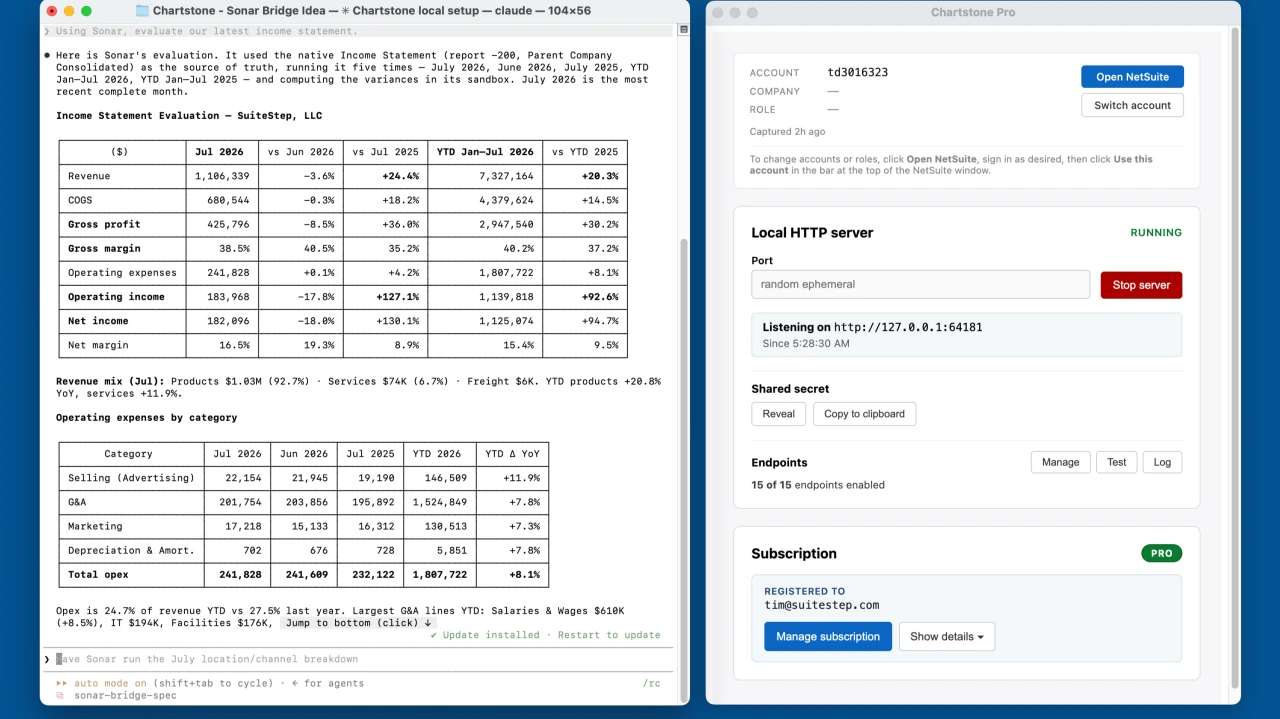
Earlier this week I asked Claude Code a question that I'd been wondering for a while: with Chartstone, can you use Sonar AI?
I meant that literally. Open Sonar, enter a prompt, wait for it to respond, and return the answer. The same way that a human NetSuite user works with Sonar.
And it turns out, it can.
Sonar AI is an AI agent that I built to run inside NetSuite. It's a Suitelet, which means that it runs in your account, in your browser, under your login and your role. Under the hood it talks to Claude, and it has roughly 85 tools available to it: SuiteQL, saved searches, the standard report runner, record load and create and update, the records catalog, the file cabinet, script execution logs, and more. It also ships with a library of 366 prompts - financial health scorecards, Accounts Receivable (AR) aging analysis, Benford's-law forensic audits, month-end close checklists - and most of those produce a finished analysis plus something you can download. I think that it's a very capable analyst. But you have to open it and type.
Chartstone is a small local server that I originally built for my own work. It runs on your Mac or PC, and turns your live NetSuite browser session into an HTTP API. Once you're logged into NetSuite, anything on your machine can POST a SuiteQL query to http://127.0.0.1:<port>/suiteql, run a report, fetch a record as JSON, or evaluate a snippet of SuiteScript. No OAuth, no integration records, no RESTlets to deploy. It's how I let Claude Code and other local agents work against NetSuite directly.
For most of the past year those two projects lived in separate worlds. But the potential connection between them is obvious. Chartstone can run code inside any NetSuite page, and Sonar is a NetSuite page. So Chartstone should be able to drive Sonar.
What I'm calling the Chartstone Sonar Bridge is a small family of routes inside Chartstone, /sonar/*, that lets an outside system hand Sonar a question or a library prompt, let Sonar's agent loop run to completion with its own model calls and its own safety checks, and then collect the transcript, the cost, and any artifacts that the agent produced. From the outside it looks like an ordinary asynchronous job API. You submit, you get a job ID, you poll or wait for a webhook, and you fetch the results. The caller never sees a NetSuite credential or an Anthropic API key, and it never gets more access than Sonar's own permission mask allows.
Here's another way of thinking about this. Chartstone turns Sonar from an AI agent you chat with into an AI agent that other systems can leverage.
My goal is to provide a way for external systems - things like schedulers, continuous integration (CI) pipelines, chat bots, other AI agents - to have a simple Web API into Sonar. That sounds modest, and I don't think that it is. An agent you have to sit in front of is a productivity tool for one person. An agent with an address is infrastructure. It can be scheduled, chained, monitored, audited, and called by other software, including other agents.
Proving the Concept
Here's how I tested the concept, in order, with Claude Code driving and a Chartstone instance running against a demo account.
The first step was reconnaissance. Claude Code pointed Chartstone's /script endpoint at the Sonar Suitelet URL and read window.SONAR_TOOLS from inside the running page. All 85 tools came back with their schemas, in about two seconds.
Then it typed a prompt into Sonar's composer, clicked Send, and waited. Sonar picked its runSql tool, wrote its own SuiteQL, and answered with a table of the three most recent sales orders. That took about 20 seconds and two model calls, and it cost roughly a cent.
The real test was a library prompt. Claude Code opened Sonar's prompt library, read all 366 entries, and ran the Financial Health Scorecard end to end. Sonar made ten tool calls along the way. Eight of them were SuiteQL queries. The other two were a native Income Statement run, used as a cross-check, and a sandboxed JavaScript calculation for the math. The result was a 40 KB HTML scorecard report. The run took 311 seconds and six model calls, and it cost $0.54.
When it was done, Claude Code harvested the complete transcript, every tool call and every result, along with the HTML artifact, and gave both to me as files on disk.
So the chain that ran was Claude Code to Chartstone to Sonar to Claude (Sonnet, in this case) to NetSuite, and back out the same way. Nothing in Chartstone or Sonar was modified. The entire bridge, as it exists today, is about eighty lines of JavaScript that runs inside the Sonar page.
What This Unlocks
Once Sonar has an address, the prompt library turns into a job catalog, and a few things that used to require a person at a keyboard become things you can schedule.
A Monday-morning finance pack - health scorecard, cash runway, AR aging, budget vs. actual - runs overnight and the artifacts land in a Slack channel or an inbox. Every run is a snapshot, so a week-over-week diff is easy.
I think that the forensic prompts - Benford's law, duplicate vendors, backdated transactions, approval-threshold bunching - are more useful as nightly sensors than as documents. Run them read-only, parse the structured result, and page someone only when something crosses a line.
A help-desk ticket tagged "NetSuite" kicks off a Sonar job with the ticket text. Sonar does the investigating (it pulls records, reads execution logs, inspects saved searches, whatever the question calls for) and posts its answer back as a comment. Nobody is waiting synchronously, so a two-minute turnaround is fine.
And other agents can be the callers. This is the one I demonstrated. An orchestrating agent - Claude Code, or anything that can speak HTTP - decides what to ask, and Sonar decides how to answer, inside NetSuite's guardrails. Wrap the bridge in a Model Context Protocol (MCP) server and every Claude Code or Claude Desktop session gets a sonar_ask tool without ever holding a NetSuite credential.
The case I'm most excited about is multi-account rollups. Many of the people I work with run more than one NetSuite account: production and sandbox at the very least, and often a parent and its acquisitions. Consultancies and managed-service providers (MSPs) might have a dozen client accounts. Today, "run the same analysis across all of them" means logging into each one and doing it by hand.
With the bridge, each account gets a Chartstone host with a logged-in session - a Mac mini on a shelf, or a virtual machine (VM) running Chartstone with a service login. An orchestrator calls POST /sonar/turns on every host with the same library prompt, say the Financial Health Scorecard, collects the results, and then does the one thing that Sonar can't do from inside a single account: it compares them.
An MSP gets a Monday dashboard with every client's overall score, and the ones that dropped since last week sorted to the top. A group CFO sees Days Sales Outstanding (DSO) and cash runway per entity, side by side, pulled from each entity's own live general ledger instead of from a consolidation export that's already three days old. A NetSuite admin runs the environment audit - feature flags, role permissions, custom-field sprawl, bundle inventory - against production and sandbox and gets a diff.
Sonar's own Multi-Entity & Consolidation prompts already handle the subsidiaries inside one account. The bridge handles the accounts. Together they cover the whole tree.
How It Works
For the developers reading this, the interesting problem was time.
Chartstone's /script endpoint loads a page in a hidden window, evaluates your JavaScript, returns the last expression, and destroys the window, all in about two seconds. A Sonar turn takes anywhere from twenty seconds to five minutes. My first attempt typed the prompt, clicked Send, and then watched the window disappear before Sonar had finished thinking.
The fix came from reading Chartstone's own eval wrapper from inside the page. The wrapper ends with return JSON.stringify({ ok: true, result }), and that return value is what Electron's executeJavaScript resolves. And executeJavaScript awaits Promises. So the bridge script replaces JSON.stringify for exactly one call with a function that returns a Promise, and it resolves that Promise with the real JSON only once Sonar's conversation store shows a final assistant message with no pending tool call. Chartstone's existing X-Chartstone-Timeout-Ms header, which allows up to 30 minutes, bounds the wait. The hidden window stays alive, Sonar does its work, and the result comes back through the front door.
Is that a hack? Yes, for sure. It leans on an implementation detail. But it's a one-line change to make it official: if the wrapper checks typeof result.then === "function" and returns the Promise, then every /script caller can simply return a Promise and Chartstone will wait for it. That change is at the top of my to-do list.
There are a few other things worth knowing before you try this.
Sonar's agent loop runs in the browser. It needs a rendered page, a logged-in NetSuite session, and an API key sitting in that origin's localStorage. There is no headless Sonar, so the bridge has to live wherever a NetSuite browser session lives. That's the one architectural constraint, and everything else follows from it.
It's one turn at a time per host. Sonar keeps a single active conversation per NetSuite origin in localStorage, and two windows on the same account would write over each other, so the design uses a single-flight queue. If you want concurrency, then you add hosts (or accounts), which is the multi-account shape anyway.
External callers still get multi-turn conversations, and Sonar's code doesn't change to make that happen. The bridge snapshots Sonar's per-conversation state - the conversation itself, plus its artifact index and query log - restores it before a turn, and captures it again after.
Artifacts get captured in the window. Sonar's downloadable artifacts are browser Blobs, and Blobs die with the window, so the bridge fetches their bytes before it lets go. File-cabinet artifacts are just NetSuite URLs and need no special handling.
Safety is Sonar's safety, and I want to be clear about that. Sonar enforces its agent mask - read-only, no-deletes, or standard - in its server-side dispatcher, where the model can't reach it. Destructive tools require approval. Every mutating call is written to the NetSuite audit log by the dispatcher, so the model can't skip that step either. The bridge leaves all of that in place and only decides which callers may run in which mode. The default for API callers is read-only, and "approve this destructive action" becomes an explicit API call that a person or a workflow tool makes on purpose.
And the job model is boring on purpose. Submit, get a 202 with a job ID, then poll, long-poll, subscribe to server-sent events, or register a webhook. When it's done, fetch the job document, which carries the final answer, the full transcript in Anthropic's message format, per-tool timings, token and cost figures from Sonar's own counters, and links to the artifacts.
Where This Stands
I'm still considering the Chartstone Sonar Bridge to be a proof-of-concept, but at this point, it's mostly proven.
What's proven is driving a complete Sonar turn from outside, including library prompts and multi-tool agent loops that run for several minutes, with the transcript and cost figures captured along with the artifacts. I've reproduced it several times against a live demo account, and two reusable driver scripts exist.
What's designed but not built is most of the rest: the Chartstone-native /sonar/* routes, the persistent Sonar window, the job queue, conversation snapshots, per-client API keys and policy, the approval flow, and webhooks. The Chartstone Sonar Bridge design document covers more than a dozen sections, with routes, request and response shapes, a state machine, and the exact page hooks that the driver depends on, all verified against the current Sonar source.
Still open: hosting (an always-on Mac or VM per account), the default permission mask for API callers (I'm leaning read-only), transcript retention, and licensing.
The rollout for this is deliberately incremental.
Phase 0 is what exists now: driver scripts running from cron on the Chartstone host.
Phase 1 will be the one-line Promise fix plus a synchronous /sonar/turns endpoint in Chartstone, which is, I think, enough for most integrations.
Phase 2 will add the job store, the queue, policy, and approvals, so that several systems can use it in production at once.
Phase 3 will give Sonar a tiny window.SonarBridge hook so that Chartstone stops depending on DOM selectors.
What I'd Try First
If you have Chartstone and Sonar AI available to you, and want to experiment with this, I'd start with something read-only that a person will really open.
A weekly finance pack is the best first project I can think of, because it uses only what already works, and it will tell you quickly what the real cost and reliability profile looks like. The artifacts it produces are also ones that people already recognize. For reference, the scorecard run cost $0.54 and took just over five minutes, and a simple question costs about a cent and takes twenty seconds.
Don't use the bridge for interactive chat from another UI. The latency floor and the single-flight queue make it the wrong tool for that, and Sonar's own UI is better anyway. And don't use it for bulk data movement; Chartstone's direct /suiteql and /restlet endpoints are the right tools for moving rows. Use Sonar, through the bridge, for judgment, and to leverage all of the advanced AI capabilities that Sonar offers.
Wrapping Up
There's a lot of talk about AI agents in enterprise resource planning (ERP) systems right now, and most of it is about the chat window. I understand why. Sonar's chat window is insanely powerful on its own, and I don't think that it needs an API to justify itself.
But the engine underneath it - the agent loop, the tools, the prompt library, the permission mask - can do far more than answer one person at a time. What the bridge does is unlock that engine and make it available to a much wider range of uses: work that can be scheduled, chained, audited, and called by other agents, all while NetSuite's own permission model stays in charge.
Chartstone and Sonar were each built to do one thing well. It turns out that together, with about eighty lines of glue code, they do something that neither was designed for. When two tools fit together that easily, I see it as a sign that the original design decisions were sound.
To learn more about Sonar AI, please visit the Anchor Group. And info about Chartstone is available here: https://chartstone.io