
Four releases in one day. Here's what changed, why, and what it means if you use an AI agent inside NetSuite.
Sonar AI is an AI agent that runs inside your NetSuite account: it answers questions and does work by calling tools (SuiteQL, standard reports, record loads and updates, the File Cabinet, script inspection) with your role's permissions, in your browser, showing you every call it makes.
Today, Sonar improved itself, based on user feedback, bug reports, and our internal product plan. It built versions 1.21.2 through 1.23.0. The theme running through all of them is honesty: the assistant should always know when its inputs are incomplete, and you should always be able to see what it's doing, what it costs, and what it's allowed to touch.
This article is an overview of what has changed.
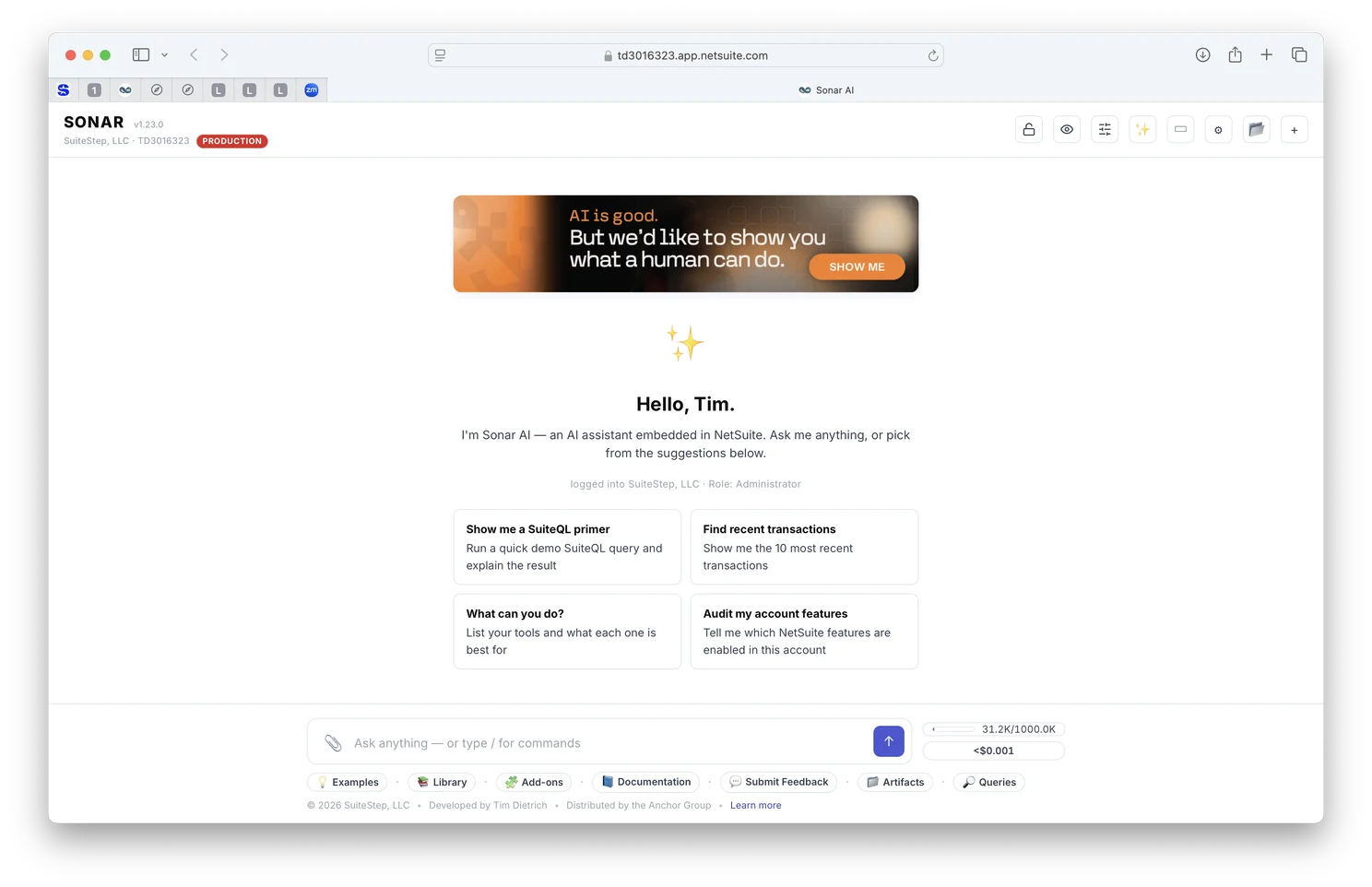
A screen shot of the updated Sonar AI user interface.
1. Accuracy: the assistant now knows when it's been short-changed
V1.21.2 · V1.21.3 · V1.22.0
We tracked down a class of defect that had been quietly eroding answer quality mid-conversation. Sonar ships with curated reference documents ("skills": SuiteQL Essentials, SuiteScript Essentials, and so on) that the assistant reads before writing queries or scripts. Those documents are 12–15 KB. The tool result cap was 10 KB. The middle third of every core skill was silently cut before the model ever saw it.
- Skills are never truncated again. Reference documents now have a 100 KB cap, separate from data results. Anything above 90,000 characters fails closed with a clear error instead of returning a fragment.
- Compaction remembers what was loaded. When a long conversation is summarised to free context, the marker now lists every skill that was read and tells the assistant to re-read them before relying on them. A partial skill is worse than no skill.
- Re-reading actually re-reads. A caching bug meant a second
skillReadreturned the first (clipped) result. Fixed, along with the cache key itself, which had been ignoring almost every duplicate call since a free-text label was added to tool inputs. - Three more "degraded input" sites now announce themselves: oversized account field notes get a visible CLIPPED banner and a warning toast; research subagents are told their summary limit and flag overruns; the compaction summariser must reproduce numbers, dates and identifiers verbatim with the tool that produced them, preserve mid-turn user instructions, and list open work under
## Open items.
If you've ever watched an AI assistant get gradually less precise over a long session, this is one of the mechanisms. The fix isn't a bigger model. It's telling the model when it's working from a fragment.
2. Chrome: a header you can read at a glance
V1.23.0
- Minimal by default. The mask, privacy, profile, model, settings, project and new-conversation controls are compact icons with real two-line tooltips (what it is and its current state, then what a click does). Prefer labels? One setting brings them back.
- Choosers instead of cycling. Controls that used to change state on every click now open a small modal listing every option with a one-sentence explanation and the current one marked. Widening permissions still asks you to confirm.
- One icon family. Emoji are gone from the chrome. Inline SVG icons render identically on every OS and tint with their chip: the permission mask is an open padlock (Standard), a slashed bin (No deletes) or a closed padlock (Read-only); privacy is eye / eye-off / eye-closed; each session profile has its own glyph.
- Colour means something. A coloured chip now means exactly one thing: a restriction is in force. The session-profile chip lost its green fill because a profile sets defaults and never gates anything. The PRODUCTION / sandbox pill got a cleaner, unmistakable red / green.
- The header subtitle is your NetSuite instance: company, account id and environment pill, linking to NetSuite Home.
3. Cost and time: know what a session actually consumed
V1.23.0
- Working time, not wall-clock. The footer chip now reads like
$0.42 · 3m 12s: the time Sonar actually spent on calls this session (model turns + tool execution + housekeeping such as compaction). Reading and typing time is excluded. Hover for the split. - Per-turn time. The small usage line under every answer now includes how long that turn took, alongside tokens and cost.
- Usage & cost modal redesigned. KPI tiles (cost, calls, tokens, cache hit rate, working time), a Where the money goes breakdown by billing component, the prompt-caching effect with net savings, per-model totals, and the most expensive turns with what ran on each.
- Compact explains itself and asks first. Clicking the context meter now tells you what compaction keeps, what it loses (counted), that it's irreversible, and offers Compact / Cancel.
4. Safe by default
V1.23.0
- Read-only on first open. A browser with no saved Sonar settings now starts with the Read-only mask. You opt into write access with one click on the padlock, and the choice persists. Existing installs keep whatever mask they had.
- Enforced at dispatch, not by asking nicely. The permission mask and Privacy Mode are still UI-click-only. The assistant cannot reach either from chat, and a blocked call returns an error that names the chip to click.
- New conversation always asks first when the transcript has anything in it: Archive / Discard / Cancel.
- Fix: Settings checkboxes. An element-helper bug wrote
checked="null"for unchecked boxes, which browsers treat as checked, so opening Settings and pressing Save could silently turn options on. If a setting flipped on you recently, this was why.
5. A proper "About"
V1.23.0
The About modal used to be a subscription-status card. It's now the single place that answers "what is this and how do I use it":
- What it is: two sentences, no marketing.
- This installation: version (linking to release notes), account and environment, who you're signed in as, tool count, model, active profile / mask / privacy.
- Where your data goes: tool calls run as you, inside NetSuite; results go only to the AI provider you configured, with your key, straight from your browser; settings and history live in your browser; every mutating call is written to NetSuite's own execution log under
SONAR_AUDIT. - Get help: What's new, slash commands, Settings, a read-only Terms of Use viewer, Contact.
- License status and refresh, then the legal line.
Small things that were bugging people
- Several modals were stuck at 540 px because of a CSS specificity fight. Fixed for all of them; the usage & cost modal is now 1080 px.
- The Chat / Workbench layout button is back in the header, and says when the narrow-screen fallback is overriding your setting.
folderListworks again for files.
What's next
Look for the latest version of Sonar (v1.23.0) to be released sometime in the coming week.
On the backlog, roughly in order: a first-run nudge explaining the Read-only default; a "Change mask" button right on a blocked tool card; a slowest-calls table in the cost modal; Escape to close every modal; a /tour command that produces a one-screen brief of your account using read-only calls; and working time in the session export.
Trust boundaries are unchanged in every release above: the assistant cannot widen its own permissions, cannot turn off Privacy Mode, and cannot delete anything without a click from you.
Sonar AI is developed by Tim Dietrich at SuiteStep, and distributed by Anchor Group, NetSuite and Ecommerce Specialists.