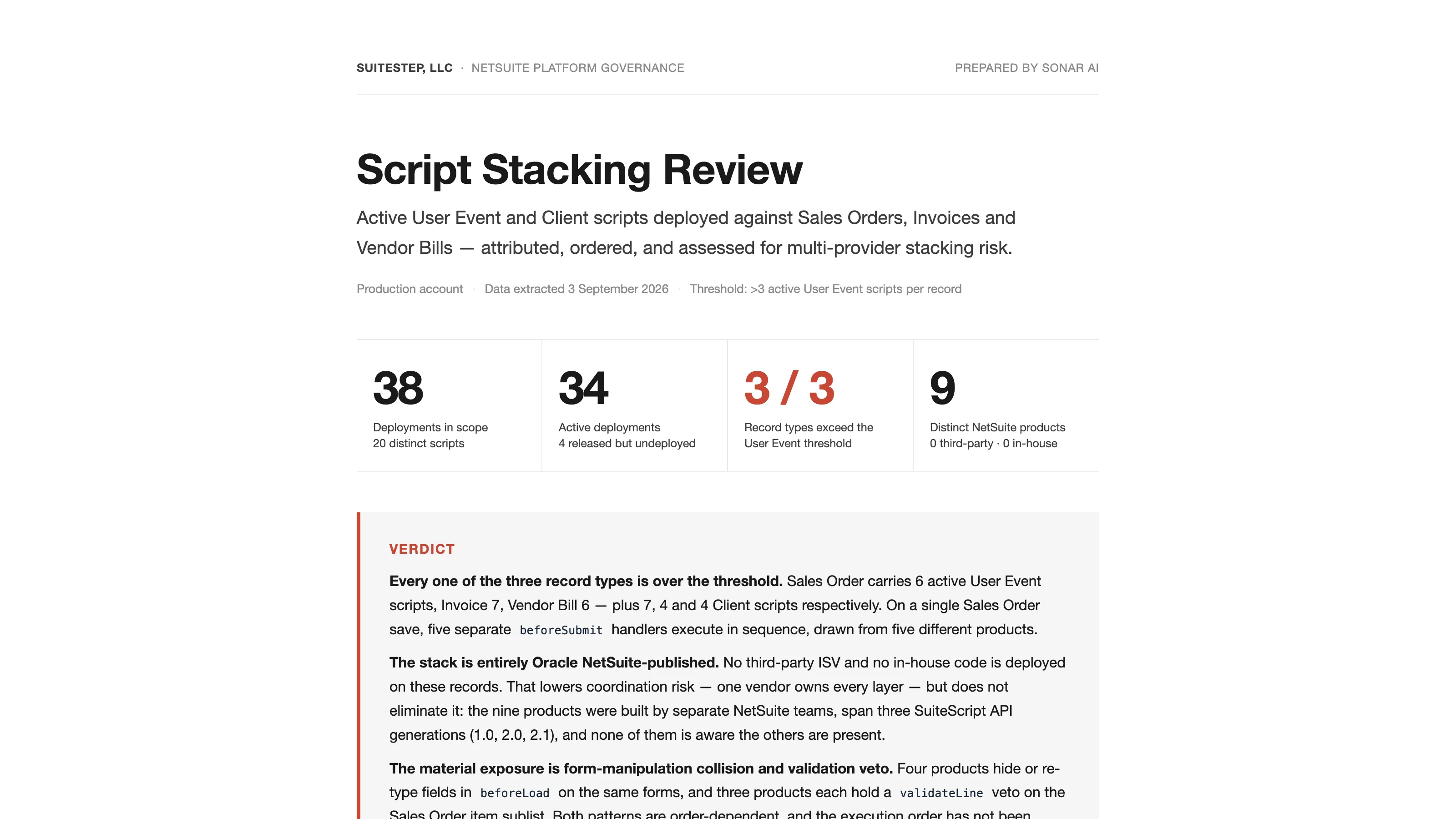
When someone saves a Sales Order on my NetSuite test account, five separate beforeSubmit handlers execute in sequence, drawn from five different products. Each one may change the record the next one reads. The last one to run can throw an error and abort the save after the other four have already done their work, and the error message will name only the last one.
All five are published by Oracle NetSuite. No third-party and no in-house code is deployed on the record at all, and the Script Stacking Review says that this lowers coordination risk without eliminating it, because the nine products on these records were built by separate NetSuite teams, span three generations of the SuiteScript API, and none of them knows the others are there. It went into the Sonar AI Prompt Library in September. If you're new to this, Sonar AI is an AI agent that runs inside NetSuite. Every prompt in the library is a playbook that I engineered and tested against live NetSuite data, and you run it inside your own account, against your own records. Nothing leaves the account, and nothing is written to it.
The Threshold
The prompt counts active user event scripts per record type, where active means released, deployed, and the parent script not inactive, and tests against a threshold of three. Sales Order carries six, plus seven client scripts. Invoice carries seven, plus four. Vendor Bill carries six, plus four. All three record types are over.
Provider attribution comes from three independent signals, the bundle field, the File Cabinet path of the source, and the script owner, and all three agree on every script. Nine products: the tax engine, the tax reporting app, a localization field manager, three modules of supply-chain management, electronic bank payments, the approvals workflow, pack and ship, available-to-build, and RMA-from-case. Eighteen of the twenty scripts are owned by the system. Two are owned by an inactive employee record, which means that failure notifications for those two have no live recipient.
The Stacking Matrix
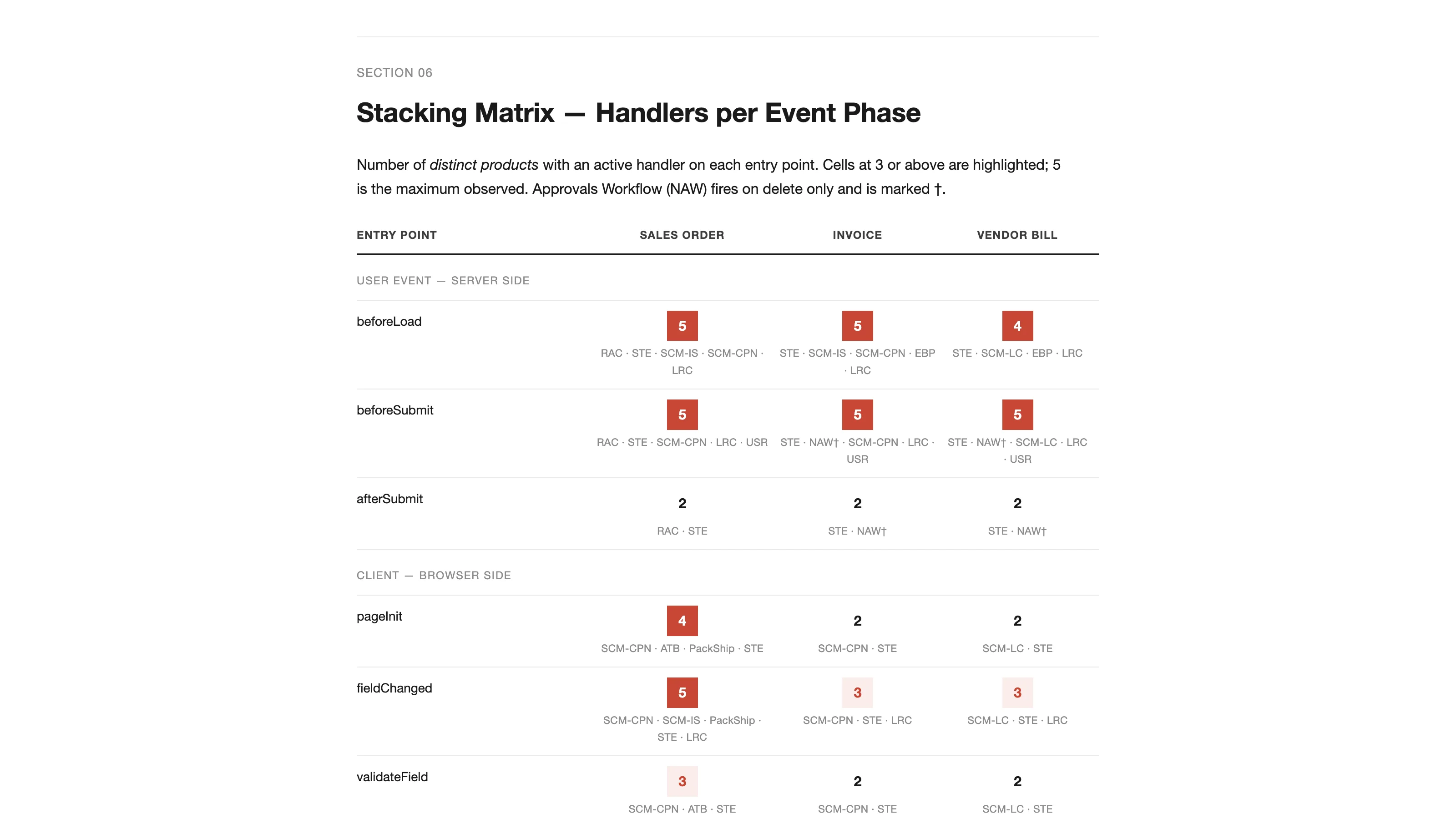
The center of the report is a matrix of entry points by record type, with the number of distinct products holding a handler in each cell. On Sales Order, beforeLoad has five, beforeSubmit has five, fieldChanged has five, and validateLine has three. Every keystroke on the item sublist runs five handlers. Every committed line passes through three independent vetoes in a fixed order, and NetSuite stops at the first one that returns false, so the user sees one message, fixes it, and may be rejected again by the second veto that hadn't yet run. The report calls that a serial-rejection experience that reads as flaky behavior.
Then it walks the record lifecycle for a single save, step by step, naming the products at each phase and highlighting the steps where one handler can block or reshape the outcome for every product after it.
Nine Risks, Account-Specific
The risk register lists only findings specific to this account, with severity reflecting the likelihood of user-visible or data-visible failure. The five-deep beforeSubmit chain is high. Competing form manipulation in beforeLoad is high, because four products hide or re-type fields on the same forms and the last writer wins, so if the localization manager's plugin list ever names a field the tax engine relies on, the tax engine's client script fails silently. The three-way line veto is high.
Then the medium ones. Two tax products deployed to the same records, where one implements all ten client entry points, so any regression in it is felt everywhere. Four released-but-undeployed deployments that a bundle update or an administrator click could re-arm without a code review, two of them older predecessors of active scripts that would double the work. Three API generations interleaved in one chain, with different error-propagation semantics. And every one of the 38 deployments runs in every execution context, all 37 of them, which means a 10,000-row invoice CSV import pays four beforeSubmit handlers and one afterSubmit handler 10,000 times each.
The two low-severity items are the honest ones. The execution order in the report follows deployment creation sequence, which is NetSuite's default, but the Scripted Records page is authoritative and didn't render in the automated fetch, so the order should be confirmed manually, and if an administrator has reordered scripts, then the conclusions about who runs last change. And the execution log is empty for all twenty scripts, which is consistent with error-level logging and no errors, but could also reflect retention, and the report says it isn't evidence of correctness.
What It Recommends
Confirm the execution order, which is thirty minutes on the Scripted Records page. Restrict execution context on the display-only user events, since a script that exists to shape the UI has no business running during a CSV import or a web-services call. Delete or un-release the four latent deployments. Raise the log level to audit on the five beforeSubmit participants for one release cycle, to see real governance consumption and any swallowed exceptions, then revert. Reassign the two orphaned scripts to a live administrator. Adopt a per-record ceiling as policy, re-running the threshold query before any new bundle or SuiteApp install, which takes under a second. And re-test the Sales Order line-entry path after any update to the three products that share the line veto.
How It's Built
Eight SuiteQL queries against the script deployment, script, file, folder, employee, workflow, and script-note tables, with a note that column names were verified against a single-row select on each table before use, because two of them have surprising names. The scope definitions are stated, including the detail that the record-type column on the deployment table stores uppercase names rather than the short codes used elsewhere in SuiteQL. Entry-point presence is counted as a handler, and the report is explicit that presence doesn't equal behavior, since source files weren't read for this review.
Wrapping Up
The SuiteScript Review Agent in the same release is the prompt that does read the source, one script at a time. This one tells you which scripts to point it at first.
Script Stacking Review is in the paid tier of the library. The full sample report from the test account is online, and I covered the whole September release in a separate post.
Run it before you install any bundle that touches transactions. On the test account, five products were already there, and none of them knew.