Last week I pointed a new AI prompt at one of the simplest saved searches in my NetSuite account. One filter, eight columns, no formula columns, no joined columns, no summary groupings. It was a company directory - customers only (well, "customers" - more on that in a minute), sorted alphabetically. I think that most NetSuite developers, myself included, would look at that search and knock out a SuiteQL version in about five minutes.
The five-minute version would have been wrong in 44 of its 66 rows.
The AI-driven version got it right and proved it, and then wrote the whole thing up in a report that a developer can hand to a colleague. The entire run, verification and report included, took under ten minutes and cost less than seven dollars.
But that "five-minute version" continues to bother me because it would have passed every check that a reasonable developer would think to run. Same row count, same companies. You could put the search results and the query results side by side and sign off after a quick scan.
Let me back up.
Why Saved Searches Get Converted
Saved searches have a way of outgrowing the UI. A search that starts out as someone's quick lookup ends up feeding a scheduled script, a RESTlet, an integration, a reporting pipeline. When that happens, the search usually needs to become a SuiteQL query. Queries are easier to embed and version control, and they're much easier to reason about in code.
The conversion looks like a mapping exercise. The search type becomes a FROM clause, the filters become WHERE predicates, the columns become SELECT expressions, and the sort becomes an ORDER BY. Every NetSuite developer has done this, and most of the time it seems to go fine.
The trouble is that a saved search definition describes what the search was asked to do. It says very little about what NetSuite's search engine does with it. The engine applies rendering and collation rules that are stored nowhere in the definition, and it makes join decisions that aren't stored there either. A column-for-column translation inherits none of that.
The Prompt
The prompt I was testing is now part of the Sonar AI Prompt Library, and it runs inside Sonar AI, an AI agent that operates inside NetSuite itself with live, read-only access to the account. The premise is simple: a conversion is done when you can prove, at the cell level, that the query returns what the search returns. Not before.
The prompt's hard rules read like scar tissue. "A zero-row match proves nothing." "On any mismatch, find the rule - never tune constants." Each rule exists to block a shortcut that produces plausible-wrong output, which I believe is the most dangerous kind of wrong there is.
The workflow it enforces goes like this. Pull the verbatim search definition and run the search unmodified to capture a live baseline. Translate mechanically, with every element of the definition accounted for. Then diff the two result sets in code - every column of every row - and chase down every mismatch until you can name the rule that caused it.
What It Caught
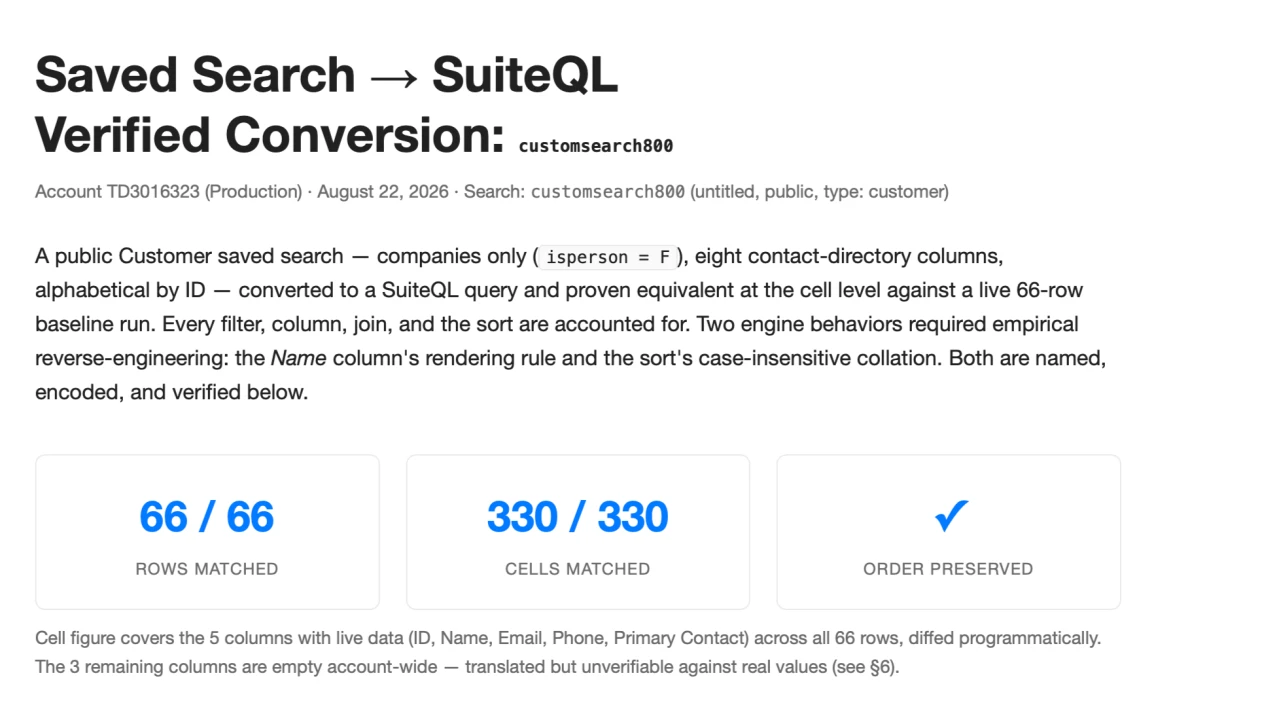
The search was a customer search filtered to companies only, eight columns, alphabetical sort. The baseline run returned 66 rows.
The first surprise was small, and expected if you've been around NetSuite long enough. Two of those 66 rows weren't customers at all. One was a lead and one was a prospect, because a "customer" saved search is really a superset that includes both. The SuiteQL customer table behaves the same way, so the results match - but it's the kind of thing that a developer consuming the query needs to know, and the prompt requires that it be documented rather than silently absorbed.
But it's the second surprise that matters most.
The search's "Name" column is defined as the altname field, and the stored altname is populated on all 66 records. Yet the search rendered that column blank on 44 of them. The definition says one thing, the database says another, and the rendered output disagrees with both.
Sonar chased it down the way the prompt demands, one record at a time. Two customers with identical stored data rendered differently, and the difference turned out to live in a field called entitytitle on the underlying entity record. Once you see the rule, it's clean: the search renders "Name" as entitytitle with the record's entityid prefix stripped off. A record whose entitytitle is "81 Acme Corp" and whose entityid is "81" renders as "Acme Corp". A record whose entitytitle and entityid are both "Davidson Supplies" renders as nothing at all, because the remainder is empty, so the cell is blank.
Once the rule had a name, encoding it in SQL took one line: LTRIM(SUBSTR(entitytitle, LENGTH(entityid) + 1)). And once it was encoded, the diff came back clean.
The sort had its own lesson. SuiteQL sorts text with binary collation, so "JBL Inc." comes before "Jasper and Associates" - a capital B beats a lowercase a. The search engine sorts case-insensitively and puts them the other way around. If the consumer of a query depends on order, then that difference is a real bug, and nothing in the definition hints that it exists. Wrapping the sort column in UPPER() reproduced the search's order in all 66 positions.
One more finding, and it's easy to miss: ten of the 66 records have no primary contact. The natural INNER join to the contact table would have dropped all ten rows without a word of complaint. The prompt requires that every join's cardinality choice be deliberate and stated, so the LEFT join is called out in the deliverable along with the reason that it has to be one.
Proving It
The verification pass diffed all 330 populated cells in code. The prompt forbids eyeballing, and for good reason: errors hide in the middle of result sets, where nobody scrolls. Five mid-list rows were then re-fetched from the saved search independently, by internal id, and compared one more time. And the final query was re-executed exactly as printed before anything shipped.
The deliverable is a self-contained HTML report: the search's verbatim definition, the final query, an element-by-element mapping table, the step-by-step conversion including the wrong turns, the verification evidence, and developer notes covering the traps that were hit and the standing ones to watch for.
You can see the full report from this run here: Saved Search → SuiteQL Verified Conversion: customsearch800.
The report documents the detective work on the Name column, and I believe that you can learn more from the one mismatch that got chased down than from the 66 rows that matched.
So what did seven dollars and ten minutes buy? A query proven equivalent at the cell level, and a maintenance document that will outlive the session that produced it. Along the way, two undocumented engine behaviors got reverse-engineered and named. Done by hand, the diagnostic work on the Name column alone - noticing the blank cells, comparing stored values against rendered output, finding entitytitle, testing the prefix rule - is an afternoon. And that assumes you notice the blank cells at all.
The caveat matters, though. This was close to a best case: 66 rows, one table, no aggregation, no formula columns. A transaction search with formula columns and a join that fans out will take more diagnostic cycles, and a 100,000-row search forces sampling instead of a full diff. My guess is that the hard ones land at two to four times the cost and time. That's still a bargain against the realistic alternative, which is a developer spending half a day on the conversion and shipping the altname bug anyway. Count-level verification is what all of us naturally do.
Wrapping Up
I'm now treating every saved search as a black box with observable behavior. The definition is a hypothesis. The live baseline is the ground truth. And equivalence is something you prove cell by cell against real data, or you can't really claim it.
I've signed off on conversions that way for years, and I think that most of us have. Row count matches, the first screen looks right, ship it. What I didn't have was any way of knowing whether the middle rows were wrong, and a conversion that's wrong in the middle rows doesn't announce itself. Somebody downstream finds it, usually months later, and usually by accident.
If you'd like to use the new prompt, look for it in the Sonar AI Prompt Library under "Saved Search → SuiteQL."