NetSuite ships no security report. There are best-practice checklists, and there are the setup pages where the settings live, but the actual posture of an account, who can log in, who's an administrator, which roles can do what, where the logins come from, which files are public, and which integrations hold standing credentials, is a census that you have to take yourself. Most accounts never take it.
I've been building a set of prompts for the Sonar AI Prompt Library that take that census. Three of them have been in the library since July. Five more are coming in the next release, including a full account review that pulls the whole picture together. This post walks through all eight.
If you're new to this, Sonar AI is an AI agent that runs inside NetSuite. Every prompt in the library is a playbook that I engineered and tested against live NetSuite data, and you run it inside your own account, against your own records.
The Full Review
The NetSuite Security and Access Review with Vulnerability Report is the one to start with. It isn't a checklist. It's a census of the account's actual identity, role, permission, authentication, data-exposure, integration, and data-integrity posture, with every finding backed by a live query, rated for severity, and traced to the specific users, roles, IP addresses, and records involved. The design goal was a report that survives a CISO or an external auditor, which means every gap the tooling couldn't close is disclosed rather than glossed over.
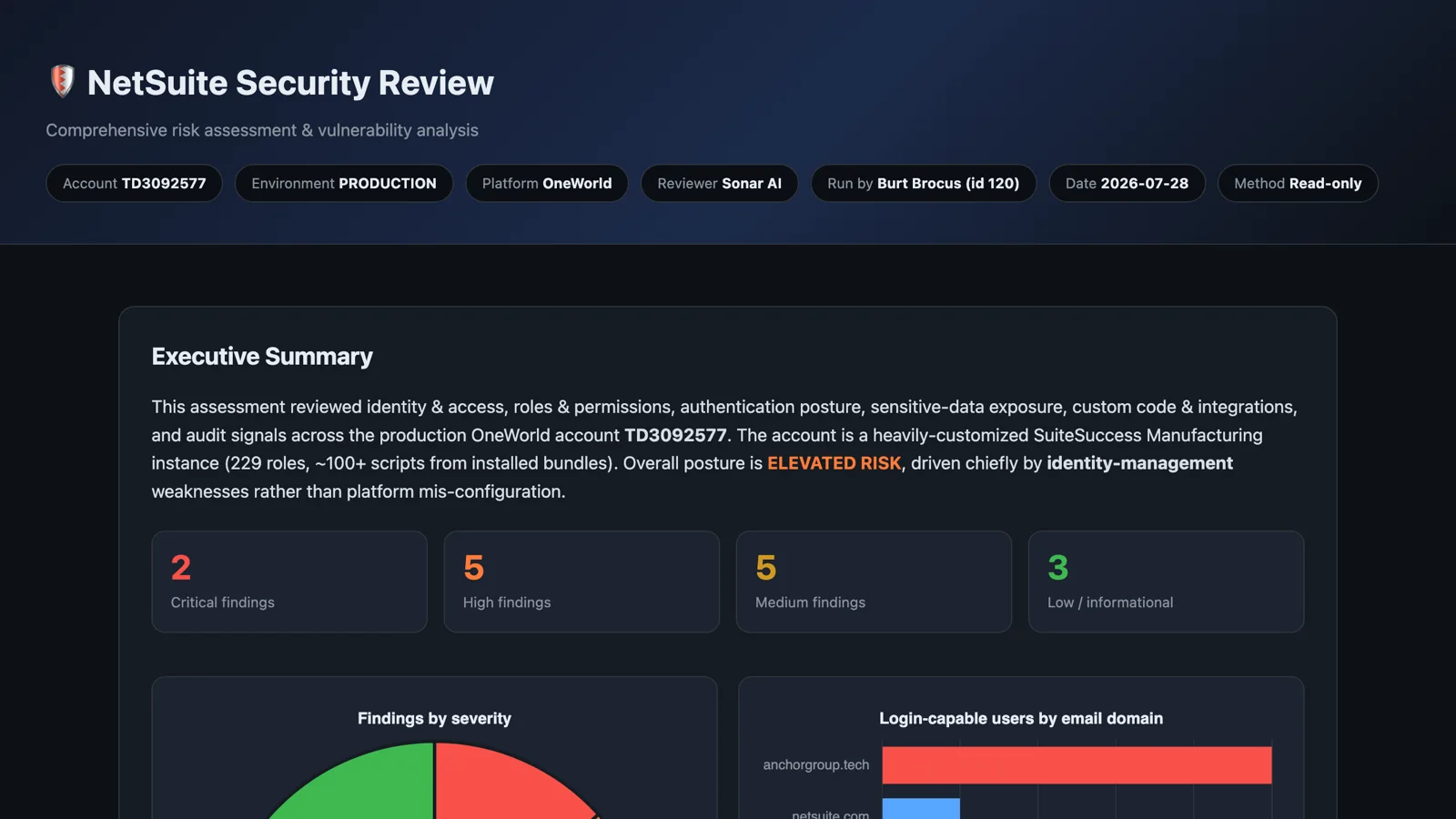
I ran it against one of my NetSuite test accounts, a heavily customized manufacturing setup with 229 roles and more than a hundred scripts from installed bundles. The verdict was elevated risk: two critical findings, five high, five medium, and three low. What I found interesting was the diagnosis. The risk came from identity management, not from platform misconfiguration.
The three things to fix that week were an administrator on a personal free-mail address with 37 successful logins from 21 distinct IP addresses in a single foreign region, plus a lockout and repeated wrong-password failures; a single email address shared by 25 active users, which collapses accountability across roles up to the CFO and controller, because NetSuite keys login by email; and eleven distinct users holding the Administrator role, where two or three named and 2FA-enforced would be the recommendation. Behind those were findings that most admins would recognize: no accounting periods locked for eleven of the last twelve months, 2,364 files marked available without login, delete rights on the file cabinet granted to 130 roles, and full access to employee Social Security numbers on six.
The report also includes the positive controls, such as the absence of any token-based authentication tokens, because an auditor wants to know what's right as well as what's wrong. It closes with the methodology and the limitations.
Sample report: NetSuite Security Review.
Roles, Permissions, and Separation of Duties
This one has been in the library since July. It audits roles, permission grants, user-role assignments, and separation-of-duties conflicts, maps the findings to the five components of the COSO framework, and delivers ISACA-aligned remediation. It's skeptical by default. The absence of a problem has to be verified, not assumed, and every role name, permission, and conflict in the report comes from a query run in that session.
Who Logged In, and From Where
The Login and Authentication Anomaly Review reads the behavioral signals sitting unread in the login audit trail: failed-login bursts, a run of password failures followed by a success, new IP addresses, UI logins on roles that should be machine-only, and shared-identity fingerprints. Pattern detection across thousands of audit rows is agent work, not spreadsheet work.
The rule that shapes it is baseline before anomaly. Per user and per role, the prompt establishes the typical IPs, authentication methods, and cadence over the full window, and then reports every anomaly against that baseline. A new IP for a user with three stable ones is a signal. A new IP for a traveling rep with thirty is Tuesday. And it reports events, not intent. "Six failures from one IP followed by a success at 2:14 a.m." is a finding. A conclusion about who was at the keyboard isn't.
What the Scripts Actually Do
The Script and Automation Security Audit answers a question no NetSuite report can: who can execute what, and what does the code actually do? It enumerates every script deployment with its status, audience, and execution context, then reads the source files from the file cabinet and flags risky patterns in the code itself: data egress, hardcoded credentials, writes to sensitive fields, dormant deployments. No human auditor cross-references deployment audience against source, line by line. That's exactly the join this audit performs, and it triages first so that a few hundred bundle scripts don't drown the review.
Who Changed What
The System Notes Forensic Review is the detective counterpart to a preventive separation-of-duties review. Not who could change sensitive data, but what actually changed in the last N days, field by field, with the old value, the new value, who, and when. The distinctive capability is correlation. A credit-limit raise followed by large orders. A vendor banking edit followed by a payment. A permission grant followed by its first use. Single events are log lines. Sequences are findings.
Its first rule is one I'd apply to all of these: attribute carefully, accuse never. "Credit limit raised from one amount to another by this user on this date" is a finding. "This user manipulated credit limits" is an accusation, and the prompt won't write it.
The Machine Side of the Perimeter
The Token and Integration Credential Audit has been in the library since July, and it covers the identities that login reviews forget. Every access token and OAuth application is a standing credential that survives password rotations and, too often, the departure of the person who created it. The prompt inventories the credentials that exist, observes the integration traffic that actually flows, and flags the mismatches in both directions: credentials with no traffic, which are stale and should be revoked, and traffic with no matching credential story, which needs investigating. It never displays a token value, not even partially.
Files Anyone Can Download
The Publicly Exposed Files Audit is also from July. The file cabinet's "Available Without Login" flag makes a file downloadable by anyone holding its URL, with no session and no role check. It exists for legitimate reasons, like web store images and email assets, which is exactly why it accumulates passengers: a CSV export flipped online to share with a vendor, a financial PDF attached to a template, a backup someone needed for a day in 2019. The prompt finds every online file, classifies it by sensitivity, and ranks what should be locked down today. It's careful to label which part is fact and which is judgment. The flag is verified data. "This file looks sensitive" is an assessment, and it's presented as one.
Governance Posture
The Governance and Compliance Posture Review is the ERP-native version of a governance review: segregation of duties, approval-workflow coverage, audit-trail hygiene, and vendor compliance. It's honest about the limits. NetSuite doesn't natively store carbon or sustainability metrics, so environmental and social factors are covered only to the extent the account has data for them, and if it has none, the report says so and scopes itself to governance. A carbon number without source data is fiction, and the prompt won't produce one.
Read-Only, All of Them
None of these prompts change anything. No deployment toggles, no role changes, no file edits during the review. They recommend, and fixes are offered afterward, individually. I think that's the only way a security review inside a production ERP should work. The value is in the census, and the census has to be trustworthy before anyone acts on it.
The Roles, Permissions and Separation of Duties Security Review, the Token and Integration Credential Audit, and the Publicly Exposed Files Audit are in the paid tier of the Sonar AI Prompt Library now. The full Security and Access Review, the Login and Authentication Anomaly Review, the Script and Automation Security Audit, the System Notes Forensic Review, and the Governance and Compliance Posture Review will be in the next release. I'll post here when it's out.