Every NetSuite admin has seen it. An item shows a negative on-hand quantity. The number is easy to spot, right there on the item record. The why is buried under hundreds of transactions, and finding it means scrolling through fulfillments, receipts, adjustments, and transfers until something looks off.
I've been working on a prompt that does that forensic work, and it'll be in the next release of the Sonar AI Prompt Library. I want to show what it does, because the method matters as much as the result.
If you're new to this, Sonar AI is an AI agent that runs inside NetSuite. Every prompt in the library is a playbook that I engineered and tested against live NetSuite data, and you run it inside your own account, against your own records.
Item and Location, Not Item
The first rule in the prompt is about grain. An item can be negative at one location and positive at another, and the item-level total can look fine while a store is selling stock it doesn't have. So the analysis starts from the item-location table, and every finding is reported at that grain.
Rebuilding the Ledger
For each negative item-location, the prompt pulls the complete inventory movement history: posting transactions only, and only the lines that NetSuite flags as inventory-affecting. That flag is the authoritative filter. Inferring inventory impact from the transaction type is a trap, because fulfillments and receipts often carry mirror lines that would double-count.
Then it validates before it analyzes. The sum of those lines has to equal the on-hand quantity that NetSuite reports, exactly. If it doesn't, the prompt stops and reconciles rather than reporting a running balance that's wrong. I think that this is the step most people skip, and it's the step that makes the rest believable.
With a reconciled ledger, the running balance is computed transaction by transaction, and the break point is defined precisely: the first transaction of the current, unrecovered negative streak. An item may have dipped below zero and recovered before, and those dips are marked too, but the break point is the one that's still open.
What It Found
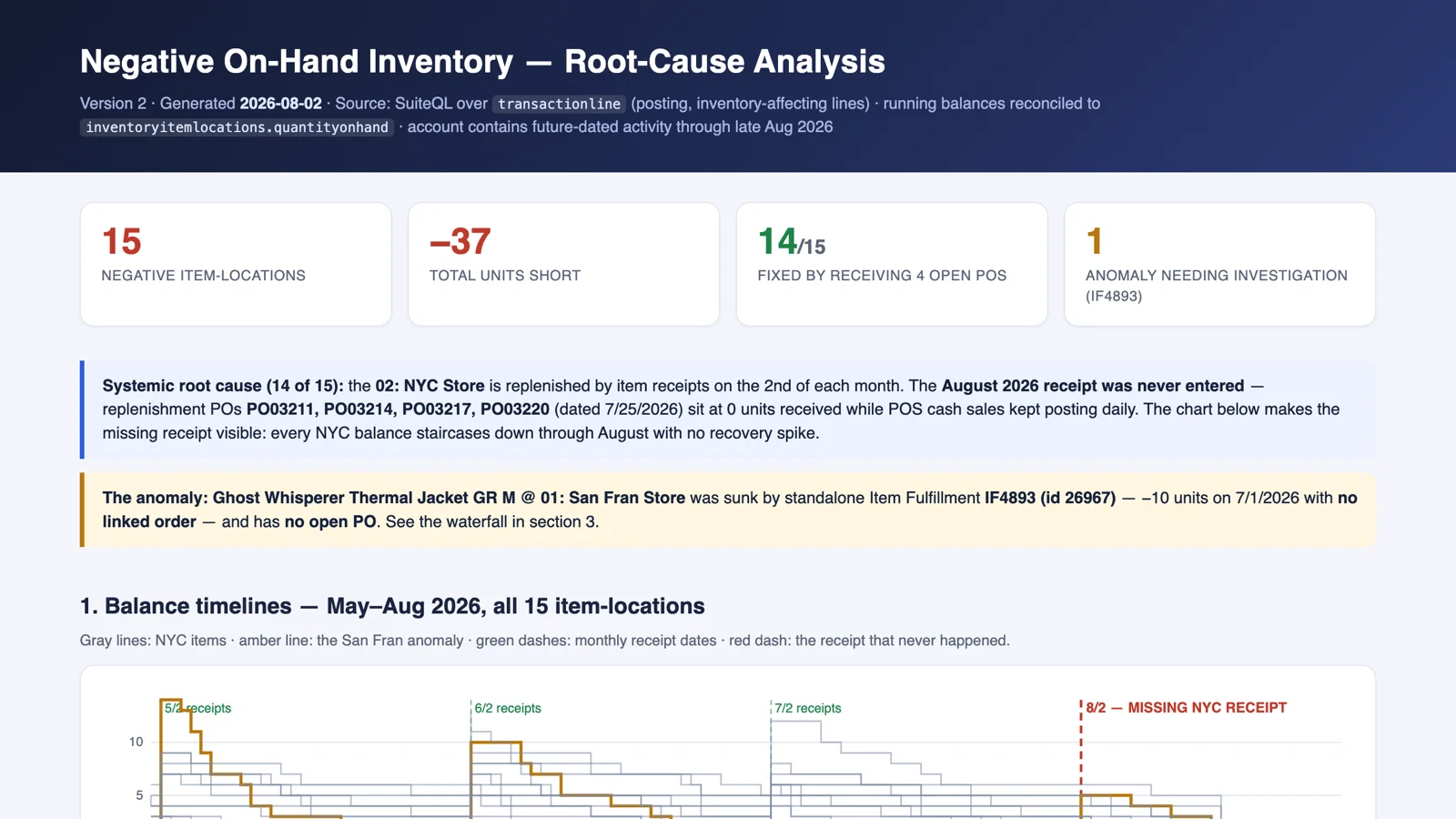
I ran it against one of my NetSuite test accounts. It found 15 negative item-locations, and 14 of them had the same cause.
The NYC store in that account is replenished by item receipts on the second of each month. The August receipt was never entered. Four replenishment purchase orders, dated July 25, sat at zero units received while point-of-sale cash sales kept posting every day. On the chart, every NYC balance staircases down through August with no recovery spike. The receipt that never happened is a red dashed line.
The fifteenth was different, and that's why the prompt treats anomalies separately from systemic causes. A thermal jacket at the San Francisco store was sunk by a standalone item fulfillment, ten units on July 1, with no linked order and no open purchase order behind it. That's not a missed receipt. That's a document that shouldn't exist, or an order that should.
Four documents resolve 14 of the 15 problems. That's the kind of sentence I want from a forensic report.
The Report
The deliverable is a self-contained, interactive HTML report. It opens with balance timelines for every affected item-location, then a sortable summary with a sparkline per row and the break-point transaction named. The anomaly gets its own waterfall. A fix-coverage section shows which documents resolve which problems, and the recommended fixes are written to be pasted into a ticket: which PO to receive, which transaction to void, which adjustment to enter, down to item, location, quantity, and date. Every full ledger is there as a drill-down.
You can see the report from this run here: Negative On-Hand Inventory: Root-Cause Analysis.
The prompt is read-only. It recommends the fixes, and a person enters them.
Who It's For
Retail, wholesale distribution, e-commerce, and light manufacturing. Anywhere inventory accuracy drives fulfillment, purchasing, and the month-end close. Negative inventory is rarely a mystery once the ledger is in front of you. The work is getting the ledger in front of you, reconciled, with the break point marked.
This prompt will be in the next release of the Sonar AI Prompt Library. I'll post here when it's out.