"Lot X is bad. Who got it?"
Every quality manager knows that question. Answering it usually means a panicked afternoon of digging through work orders, fulfillments, and spreadsheets, and the answer that comes back is only as complete as the digging was. I've been working on a prompt that answers it in minutes, with every quantity reconciled, and it'll be in the next release of the Sonar AI Prompt Library.
If you're new to this, Sonar AI is an AI agent that runs inside NetSuite. Every prompt in the library is a playbook that I engineered and tested against live NetSuite data, and you run it inside your own account, against your own records.
Both Directions
Give the prompt a lot or serial number, and it traces the full family tree. Upstream, that means where the lot came from: receipts, adjustments, the builds that produced it, and the component lots that those builds consumed. Downstream, it means the builds that consumed this lot, the lots they produced, and every shipment, invoice, and customer on the other end.
A one-directional trace is incomplete for recall purposes, and the prompt says so in its rules. If a bad component went into a build, the customers who bought the finished assembly are exposed too, and they're two generations away from the lot number you started with. The prompt keeps tracing until it hits receipts upstream and customers or on-hand stock downstream. Two to four generations is typical.
The Quantities Have to Foot
For every lot in the tree, total inflows must equal consumption plus shipments plus on-hand, with transfers treated as net-zero internal moves. The report shows that arithmetic explicitly, and if it doesn't foot, the discrepancy is flagged in red. A genealogy that doesn't reconcile is worse than none, because it looks complete and isn't.
The prompt also flags the gaps that an auditor would ask about: components in a build that aren't lot-tracked, shipments with no linked invoice, affected customers with no email or phone on file, and lots with no expiration date where the item class suggests they should have one.
And it treats on-hand units differently from everything else, because they're the ones you can still do something about. Units still in stock can be quarantined before they ship, so the report surfaces them separately and puts them first.
What It Found
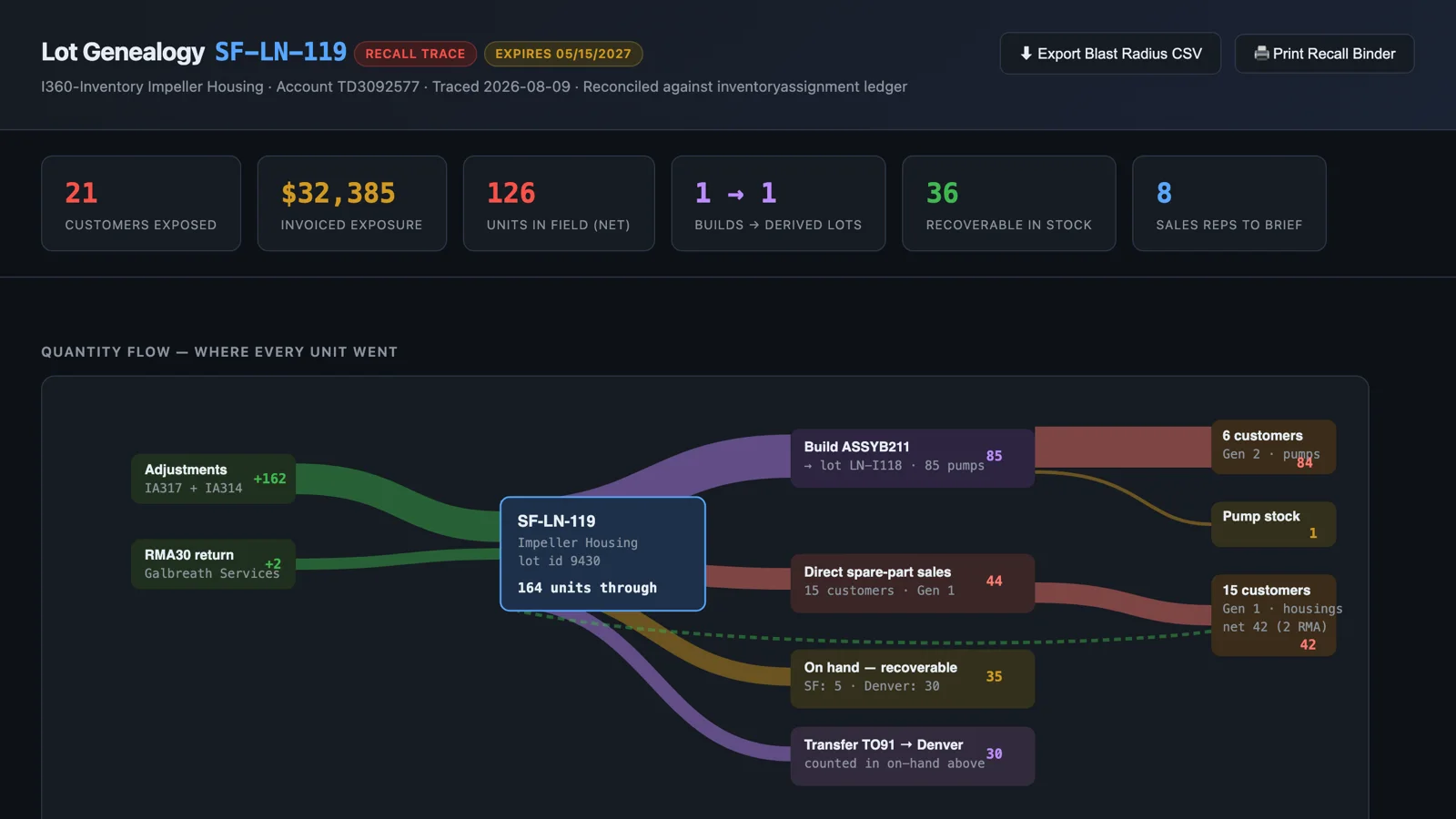
I ran it against one of my NetSuite test accounts, on a lot of impeller housings. The trace took 164 units through the lot: 162 from two inventory adjustments and 2 that came back on a return. Of those, 85 were consumed by an assembly build that produced 85 pumps, and 84 of the pumps shipped to six customers. Another 44 housings were sold directly as spare parts, to 15 customers. Thirty-five were still on hand, five in one location and thirty in another that had received them on a transfer order.
The reconciliation line at the bottom of the report reads like this: 164 in, equals 85 consumed plus 44 shipped plus 35 on hand. And for the derived lot: 85 built, equals 84 shipped plus 1 on hand. Both foot.
The headline numbers were 21 customers exposed across two generations, 126 units in the field, $32,385 of invoiced exposure, 36 units recoverable in stock, and 8 sales reps to brief. The gaps it flagged were real: the co-component in the build wasn't lot-tracked, two shipments had gone out without an invoice, and two customers had no email address on file. Those are the rows to chase first, and the report marks them.
The Dashboard
The deliverable is an interactive, drillable dashboard. It opens with a quantity-flow diagram showing where every unit went, with the ribbons scaled to units and the flows that end at customers colored red, because that's the exposure. Below it is a genealogy tree that expands and collapses, with every lot, transaction, and customer deep-linked back to its NetSuite record. Then a sortable "blast radius" table with contacts, sales reps, and invoiced dollars, which exports to CSV with one click. And a print-ready recall binder page for the file.
You can see the dashboard from this run here: Lot Genealogy: SF-LN-119 Recall Trace.
Who It's For
Food and beverage, medical devices, pharma, aerospace, and any lot-tracked manufacturing or distribution business. If you're subject to FDA, ISO 13485, AS9100, or FSMA expectations, this is recall readiness on demand, and it's the kind of thing your auditors will ask to see run.
The technical footnote, for the NetSuite developers reading: the backbone of the whole thing is the inventory assignment table, and the join to transaction lines is composite. Both keys are required, and the prompt says so, because getting that join wrong is the difference between a tree and a mess.
This prompt will be in the next release of the Sonar AI Prompt Library. I'll post here when it's out.