A few days ago, I wrote about a client project that I'm working on that involves developing a custom NetSuite purchasing tool (see "Use SuiteQL to Get Item Vendors"). In that post, I shared a simple query that I'm using in the app to get a list of vendors that carry an item.
There's a lot of information that my client's purchasing agents need in order to make their purchasing decisions. This is a client that has multiple locations in which their inventory is stored, including six regional warehouses, several contract manufacturing locations, and a few locations set aside for consignment purposes. So the purchasing tool needs to provide location-specific inventory information - values such as quantity on hand, on order, and so on.
Essentially, the app needs to display information that's similar to what is presented in NetSuite on the Item's Purchasing / Inventory > Locations tab. For example, here's what the location-specific information looks like for an item in a test account.
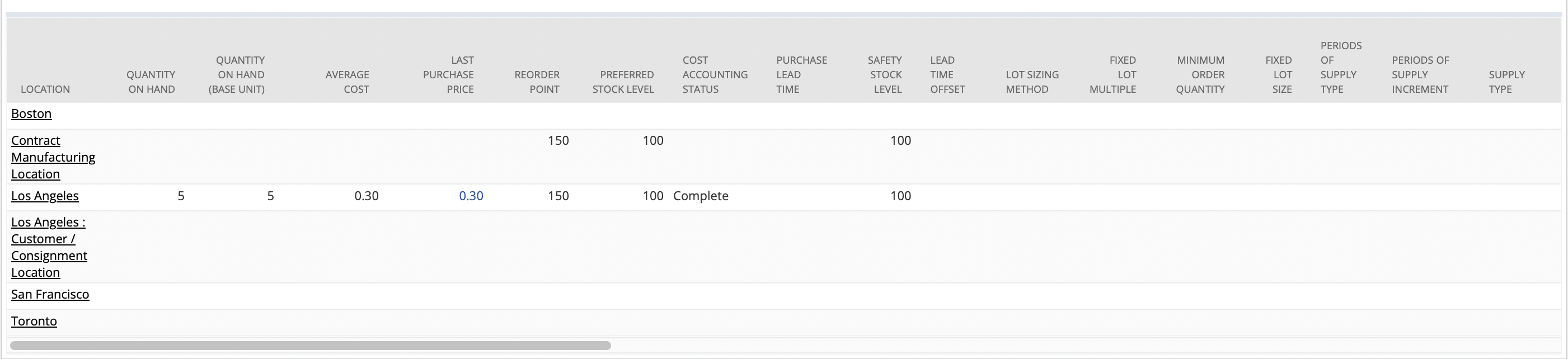
Click the image to view a larger version.
Thankfully, NetSuite makes accessing that data very easy. In fact, it's available from a single table (actually, it's most likely a view) called AggregateItemLocation.
I first wrote about the AggregateItemLocation table in July of last year, in a blog post titled, "Use SuiteQL to Get Last Purchased Date and Price for Multi-Location Inventory." In that post, I was joining to the AggregateItemLocation to get an item's location-specific Last Purchase Price.
The query that I worked up for my current project is shown here.
SELECT
	BUILTIN.DF( Item ) AS Item,
	BUILTIN.DF( Location ) AS Location,
	QuantityOnHand,
	OnHandValueMLI AS Value,
	AverageCostMLI AS AverageCost,
	LastPurchasePriceMli AS LastPurchasePrice,
	PreferredStockLevel  AS PreferredStockLevel,
	LeadTime AS PurchaseLeadTime,
	SafetyStockLevel,
	LeadTimeOffset,
	QuantityOnOrder,
	QuantityCommitted,
	QuantityAvailable,
	QuantityBackOrdered,
	QuantityInTransit,
	QtyInTransitExternal AS QuantityInTransitExternal,
	LastInvtCountDate AS LastCountDate,
	NextInvtCountDate AS NextCountDate,
	InvtCountInterval AS CountInterval,
	InvtClassification AS Classification,
	CostingLotSize
FROM
	AggregateItemLocation
WHERE
	Item = 212
ORDER BY
	Item,
	Location
There really isn't much to this query, but it sure does return a lot of helpful information. In fact, there are additional columns that it provides that I'm not using in the query, and I encourage you to explore the table to learn more.