Earlier this week, I posted a preview video to LinkedIn of a project that I've been working on. The project is called SuiteConsole, and it's a tool that NetSuite developers can use to quickly and easily run SuiteScript. I've received a lot of inquiries about SuiteConsole, so I thought I'd provide some more information about it here on my blog.
SuiteConsole
SuiteConsole is essentially an enhanced, standalone JavaScript console. It runs on macOS, Windows, and Linux.
When the app opens, you're prompted to log into NetSuite.

Click the image to view a larger version.
You then navigate to any SuiteScript supported record, such as a sales order, a contact, etc. Once you're there, you click a button to continue.

Click the image to view a larger version.
SuiteConsole's code window will open. As a precaution, if you've logged into a production account, a warning message is displayed.

Click the image to view a larger version.
At that point you can write and run SuiteScript.
SuiteConsole automatically loads these SuiteScript modules: N/action, N/currency, N/currentRecord, N/email, N/format, N/format/i18n, N/http, N/https, N/log, N/query, N/record, N/recordContext, N/runtime, N/search, N/sso, N/suiteAppInfo, N/transaction, N/translation, N/ui/dialog, N/ui/message, N/url, N/util, N/xml
As you run code, SuiteConsole displays the number of usage units that are remaining. You start off with 1,000 units - the same number of units that you have available for Client Scripts.
Here's a screen shot showing the results of a script that loads and displays the current record. Notice that after running the script there are 995 units remaning.
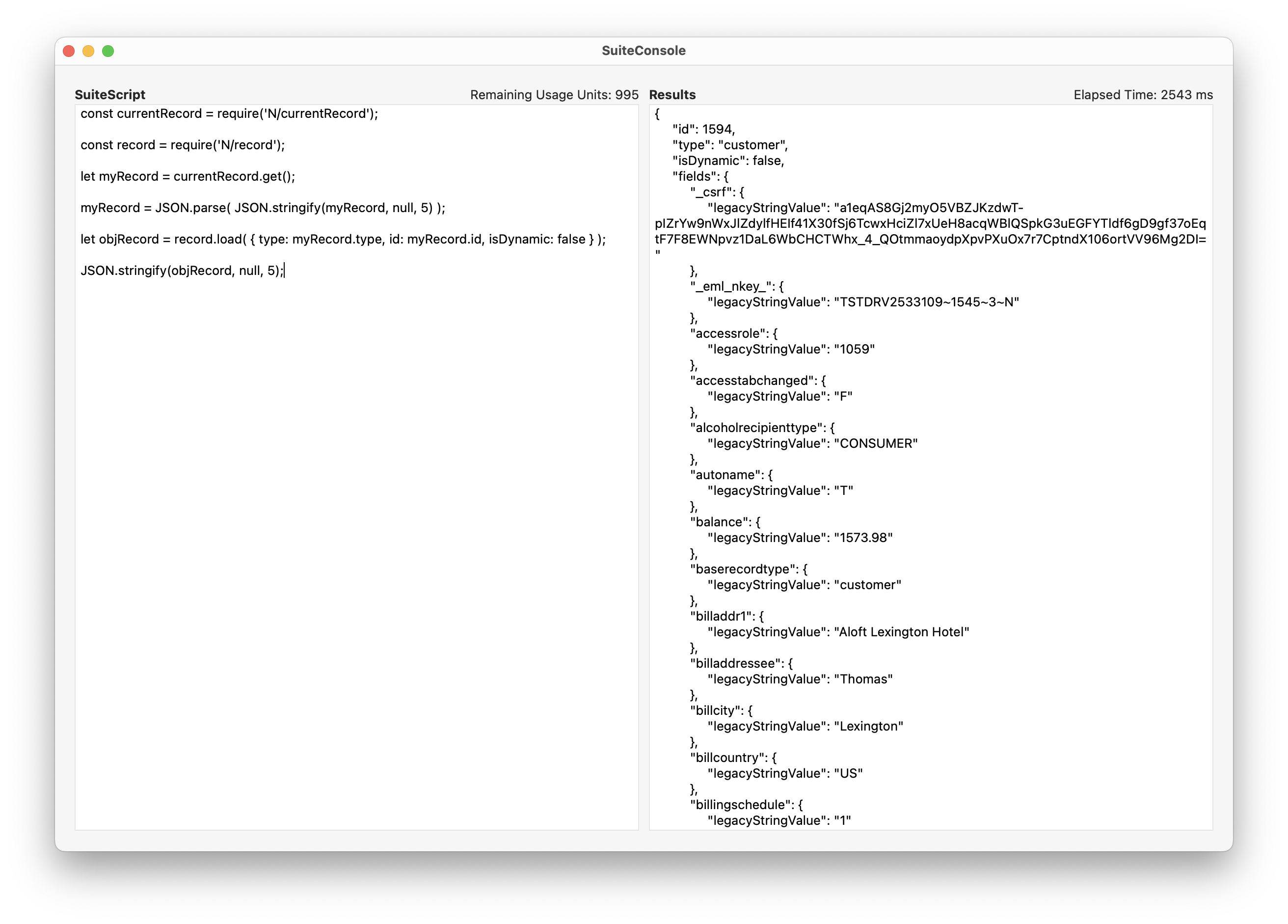
Click the image to view a larger version.
Here's another screen shot, this time showing the results of a script that uses SuiteQL to select Opportunity transactions.
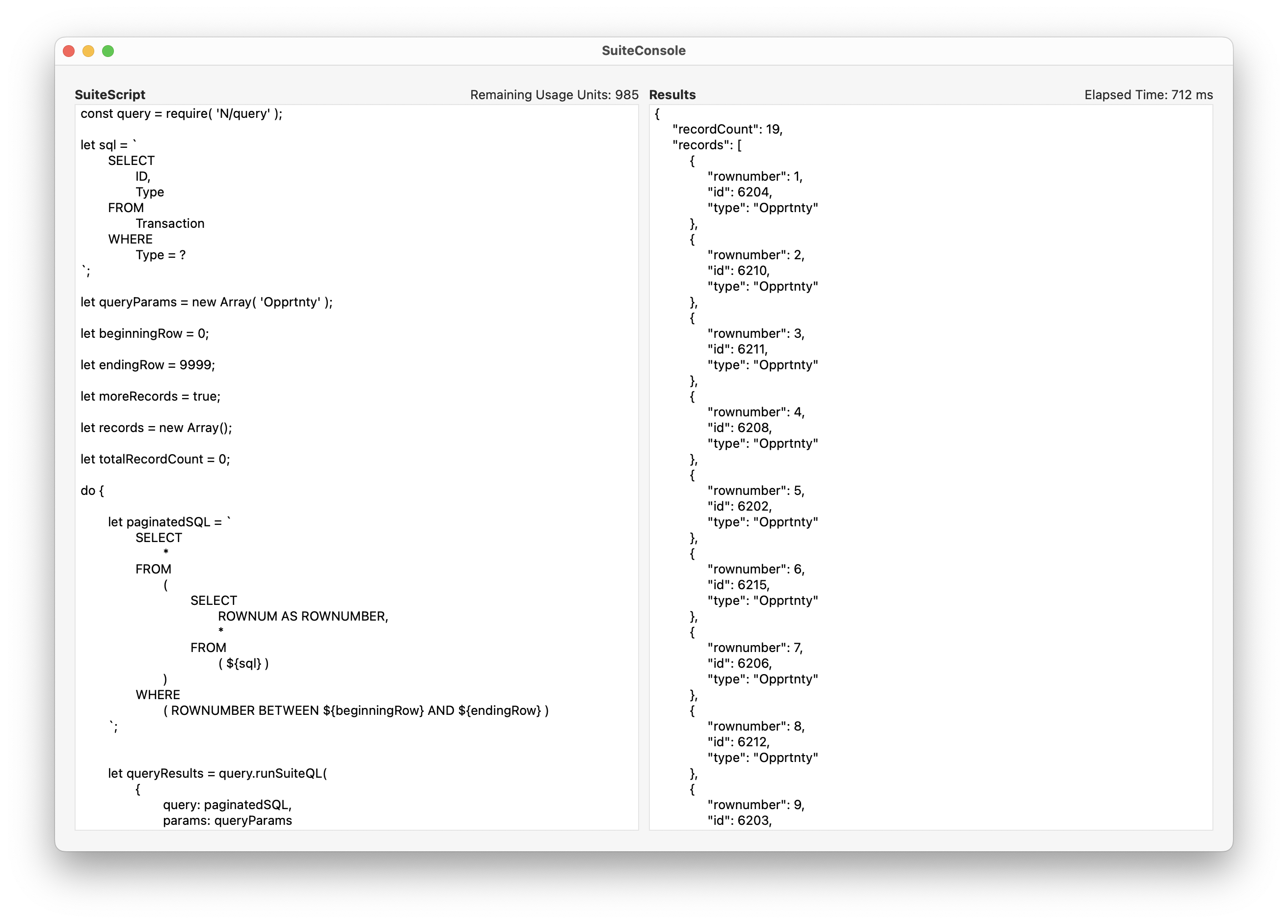
Click the image to view a larger version.
Notice that the usage units remaining is now 985. That's because a call was made to the query.runSuiteQL method, which consumes 10 usage units. In a single SuiteConsole session, you could call the query.runSuiteQL method 100 times, pulling up to 5,000 records in each call. So in theory, you could pull 500,000 records in a single session. (During testing, I was able to pull around 250,000 records in just under 26 seconds.)
SuiteConsole's Origin: The SuiteQL Schema Tool
SuiteConsole is the byproduct of another project that I'm working on - the SuiteQL Schema Tool, a project that I first announced back in January. After a lot of false starts, I decided to approach the SuiteQL Schema Tool in a different way - as a desktop app that runs on macOS, Windows, and Linux.
The SuiteQL Schema Tool uses a framework that is similar to that used by SuiteConsole. It makes calls to the Records Catalog API to get information about the NetSuite account's schema. It then loads that information into a SQLite "in-memory database," and uses the SQLite FTS5 Extension to build a virtual table that you can execute full-text queries against. It's incredibly fast and flexible.
Here's a preview of the SuiteQL Schema Tool, where I'm running a few full-text queries against the schema database.

Click the image to view a larger version.
In this example, I'm using a schema file generated against a NetSuite account that is configured for SuiteCommerce Advanced. The schema consists of 1,127 tables, and a total of 14,175 columns (fields).
Wrapping Up
I'm developing SuiteConsole and the SuiteQL Schema Tool using Xojo, a low-code, cross-platform application development tool. I've written about Xojo extensively over the past few months. If you'd like to learn more about Xojo, check out these posts:
• NetSuite and Low-Code App Development
• NetSuite: Xojo Low-Code Webinar Follow-Up
• NetSuite Integration with SuiteAPI and Xojo
SuiteConsole is nearly ready for beta testing, but the Schema Tool still needs a bit more work. My goal is to release both apps in January. If you're interested, I'll be posting updates here on my blog and over on LinkedIn.